Compare Salesforce Translation Workbench vs Simple Translate: bulk metadata localization, AI‑driven translations, DevOps integration for faster, error‑free deployments.
Before Simple Translate came along, administrators had to:
Use the Translation Workbench to localize metadata.
Manage translations without a structured and defined process.
Deal with a complex export/import process using SFT files.
Translate manually without an automated translation engine.
Handle errors, mismatches, or missing translations, especially when managing a large global organization.
This process was time-consuming, repetitive, and left a lot of room for mistakes.
How Simple Translate Makes a Difference
Simple Translate automates key parts of the translation process:
Bulk Translations: Handle up to 10,000 translations with just a few clicks.
Multiple Metadata at Once: Translate a wide range of metadata types in a single run.
Multiple Language Translation: Translate metadata into multiple languages simultaneously.
Automated Translation: Translate with your preferred AI assistant or translation engine like Google, AWS or DeepL.
Easy Retrieve: Retrieve various metadata from your Salesforce Org in just a few clicks.
Easy Deployment: Deploy translation metadata into your Salesforce Org with a single click.
DevOps Friendly: SimpleTranslate seamlessly integrates into your DevOps pipeline.
Custom Field Translation Example
Salesforce Translate - The Old and Slow Way
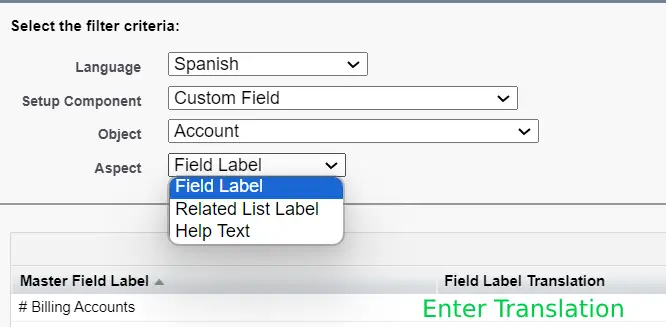
With Salesforce's old method, most metadata had to be translated manually, one by one, via the Translation Workbench.
To translate Custom Fields, the following steps need to be executed:
Select the object’s Custom Field
Choose target language
Choose aspect to translate
Field Label
Related List Label
Help Text
Enter the translation manually for each metadata translation.
For each translation, you need to repeat this process. Imagine doing this for 100 fields all manually.
Simple Translate - The Simple Way of Translating
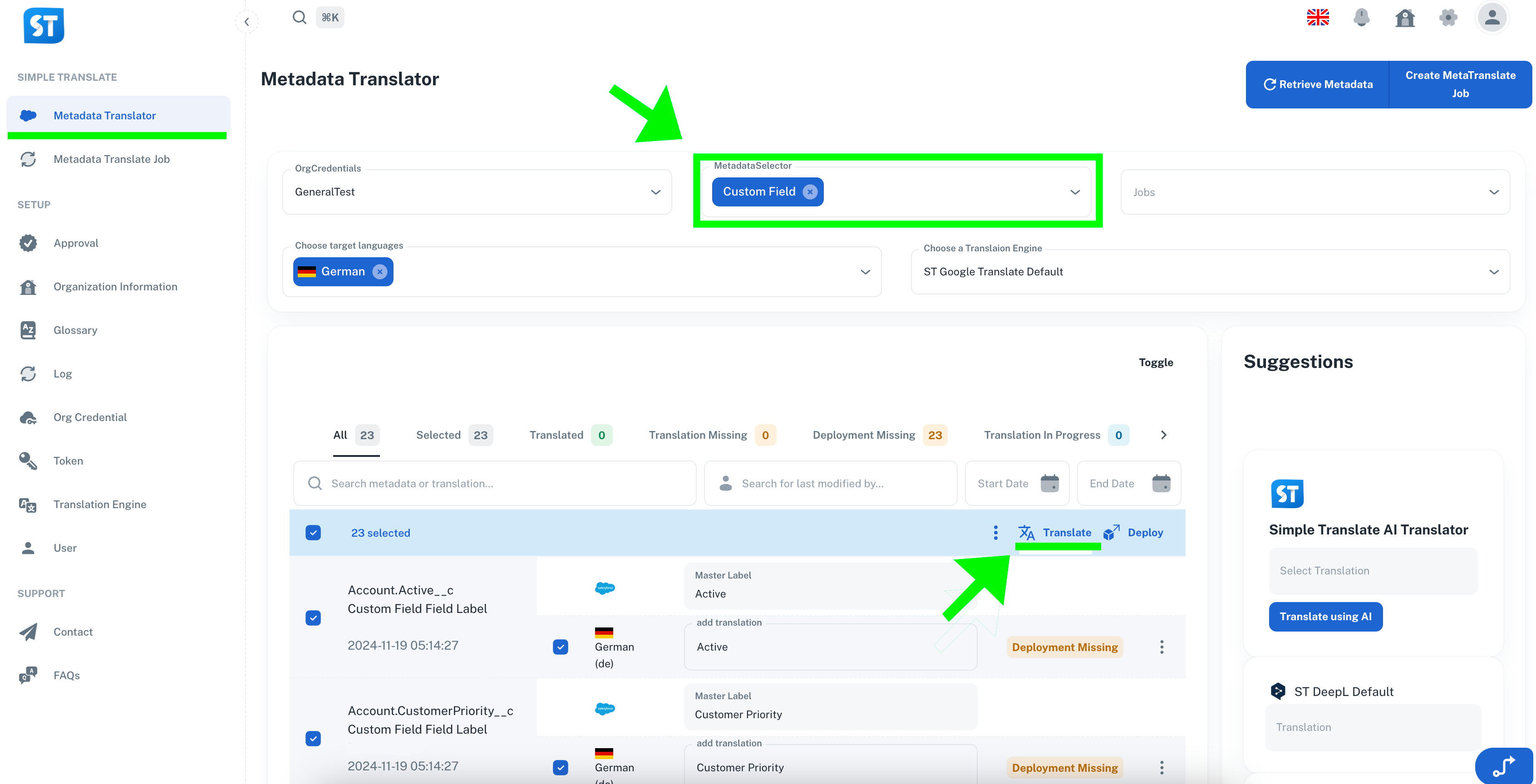
With Simple Translate all metadata can be translated in one place via the Metadata Translator,
You can translate one or multiple metadata items at once.
To translate Custom Fields, following simple steps are necessary:
In MetadataSelector select Custom Field
(you can also combine it with a lot other Metadata at once)Choose the target languages.
Select one or multiple metadata items.
Choose a translation engine.
Click Translate
After a successful translation, click Deploy
SAVING TIME with Simple translate is simple!
With the Salesforce Translation Workbench translating 20 metadata types into 10
languages manually took around 1 to 1.5 hours (one metadata type into one language
using takes 20-30 seconds)With Simple Translate, the same task takes around 5 minutes.
Save time. Avoid repetitive work. Automate your translations.
For technical implementation details and configuration options, visit our SimpleT Documentation.
Published:
Back to the Articles List